


Account & Data Deletion
Introduction:
At Apna Bazaar, we value your privacy and trust. We understand that you may, at some point, wish to delete your account and all associated personal data. This page provides clear instructions on how to do so.
How to Delete Your Apna Bazaar Account & Data (In-App)
The easiest and most recommended way to delete your Apna Bazaar account and all associated data is directly through the app. This ensures a seamless and secure process.
Follow these simple steps:
Open the Apna Bazaar App: Launch the Apna Bazaar grocery shopping app on your mobile device.
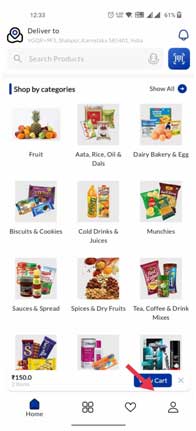
Navigate to Your Profile/Settings:
Tap on the Profile icon.
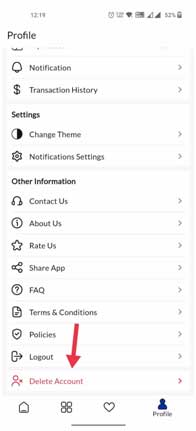
Initiate Account Deletion:
On the Profile screen, locate and tap the “Delete Account” button.
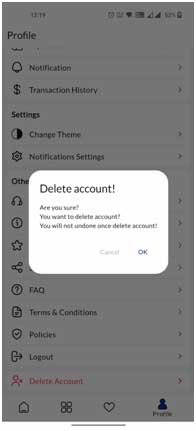
Confirm Deletion:
You will be prompted with a confirmation message to ensure you wish to proceed.
What Happens After Deletion?
Once your account deletion request is confirmed:
All Your Personal Data: Your name, email address, phone number, saved addresses, payment methods (if stored by us), and preferences will be permanently removed from our systems.
Order History: Your past order history will be permanently deleted.
Account Access: You will no longer be able to log in to the Apna Bazaar app with your deleted credentials.
Need Assistance or Have Questions?
If you encounter any issues during the deletion process, or if you have any questions regarding your data privacy, please do not hesitate to contact our support team:
Email: [email protected]